



What’s in this Guide
- Government Website Development by the Numbers
- Government Website Design: Solving for Resident Tasks, Not Just Looks
- Government Web Development: The Technical Foundation
- Government Online Payments: Earning Resident Trust
- Government Payment Integration: Connecting to What You Already Run
- Government Payment Portal: Choosing the Right Setup
- Government Permit Systems: Moving Permitting Online
- Online Government Permit System: What Residents and Staff Should Expect
- Government Workflow Automation Across Departments
- Fast Answers to Common Government Website Development Questions
- Accessibility, ADA, and Section 508 Compliance
- Security Standards for Government Websites
- Government Website Development Launch Checklist
- How Advanced Systemics Approaches Government Website Development
- Follow Advanced Systemics
- Conclusion
- Frequently Asked Questions
Government website development has moved from a back-office IT line item to a front-line commercial decision. When a resident can pay a bill, apply for a permit, or renew a license online in minutes, an agency reduces call volume, cuts staff overtime, and collects revenue faster. When the site fails at that basic task, the agency absorbs the cost in phone calls, walk-ins, and delayed payments.
That’s why procurement teams evaluating government website development in 2027 are asking harder questions than whether a site looks modern. They want to know whether the platform can process payments securely, route permit applications automatically, and hold up under a security review.
This guide walks through what commercially focused government website development actually requires: the technical foundation, the payment and permit workflows, the compliance standards, and the questions worth asking before you sign a contract.
Government Website Development by the Numbers
The push toward better government website development isn’t coming from IT departments alone; it’s coming from residents. In a U.S. national Deloitte survey, 55% of respondents said they prefer accessing state government services online, and 50% said the same for local services, yet only 23% reported regularly using digital government services in practice.
Payment behavior shows the same gap. A U.S. national Springbrook citizen survey found 71% of respondents said their ideal way to pay a government agency is online or through an app, versus just 15% who are content mailing a payment. Mobile matters too: Pew Research puts U.S. smartphone ownership at 91%, with 16% of adults relying on a smartphone as their only way online, which means government website development that isn’t mobile-first is excluding residents by design.
| Metric | Data Point | Source |
|---|---|---|
| Prefer state services online | 55% | Deloitte (U.S. survey) |
| Prefer local services online | 50% | Deloitte (U.S. survey) |
| Regularly use gov. digital services | 23% | Deloitte (U.S. survey) |
| Prefer paying agencies online/app | 71% | Springbrook (U.S. national survey) |
| U.S. adults who own a smartphone | 91% | Pew Research Center |
| U.S. adults who are smartphone-only internet users | 16% | Pew Research Center |
| Increase in mobile bounce probability, 1s to 3s load | 32% | Google/SOASTA |
| Increase in mobile bounce probability, 1s to 10s load | 123% | Google/SOASTA |
That last row on page speed matters more than it looks. Government website development projects that skip performance testing are effectively building a payment or permit page residents will abandon before it loads. The table below shows how mobile bounce probability climbs as load time increases.
Page Load Time vs. Mobile Bounce Probability (Google/SOASTA)
| Page Load Time | Increase in Mobile Bounce Probability |
|---|---|
| 1 second | Baseline |
| 3 seconds | +32% |
| 7 seconds | +90% |
| 10 seconds | +123% |
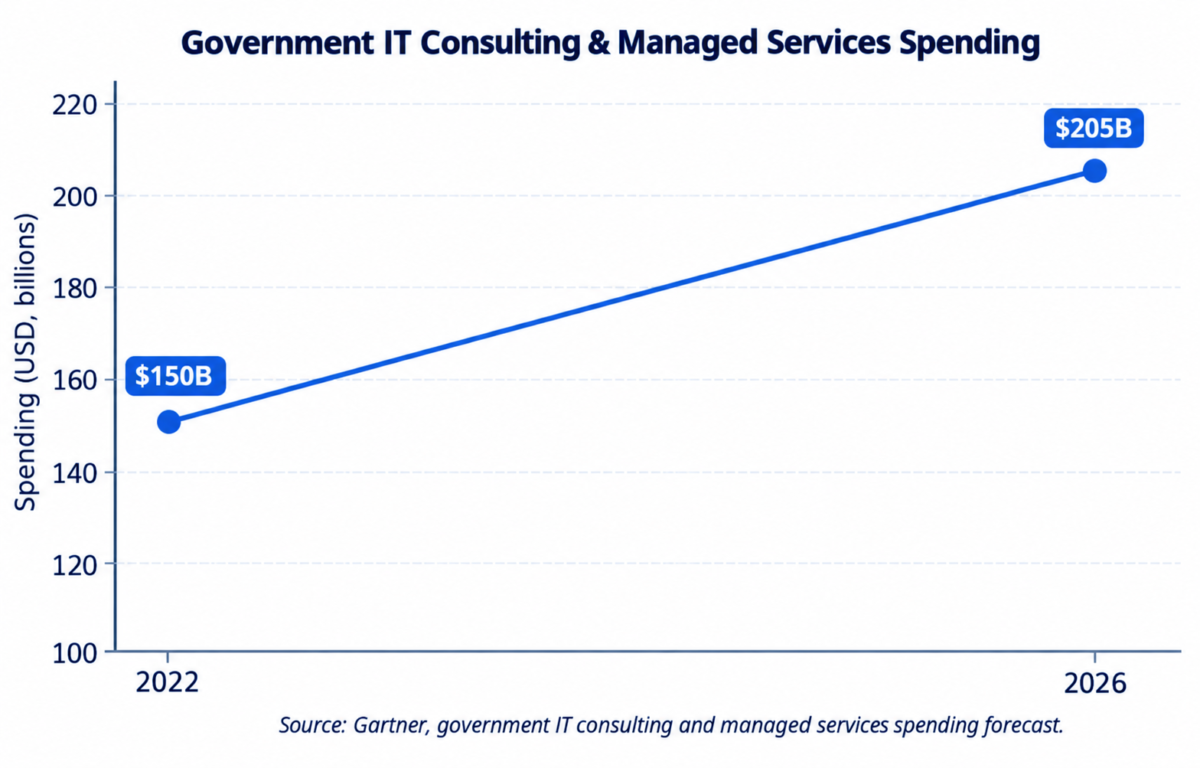
Gartner projects government spending on IT consulting and managed services growing from roughly $150 billion in 2022 to more than $200 billion by 2026, as agencies fund exactly the kind of payment, permit, and workflow modernization covered in this guide. For agencies evaluating government website development, that budget shift is a signal that the investment case is only getting stronger, not a passing trend.
Government Website Design: Solving for Resident Tasks, Not Just Looks
Government website design starts with the resident’s task, not a homepage banner. Most visitors arrive needing to pay a bill, apply for a permit, or find a public record, and the design needs to get them there in as few clicks as possible, whether they’re on a phone, an older browser, or a screen reader.
That means navigation organized around resident tasks rather than internal department charts, accessibility built in from the first wireframe, and a visual style that reads as official and trustworthy without feeling dated. Government website development that treats design as a compliance checkbox tends to produce sites that pass an audit but still frustrate the people using them.
Government Web Development: The Technical Foundation
Underneath the design, government web development has to hold up under constraints most commercial sites never face: uptime during emergencies, integration with legacy back-office systems that can be decades old, and security reviews that can take months. A team without public-sector experience often underestimates how much of a government website development engagement is integration work rather than new feature building.
Solid government web development means building on a platform your IT staff can actually maintain, WordPress, Drupal, or a custom CMS, with documentation, staging environments, and hosting that meets your agency’s data-residency and security requirements. This is also where page speed gets decided; a payment page that takes ten seconds to load is losing well over double the visitors it would at a one-second load time.
Government Online Payments: Earning Resident Trust
Government online payments are one of the highest-stakes features on any public-sector site, because residents are trusting the agency with financial and identifying information. A payment flow that redirects to an unfamiliar domain, uses outdated forms, or fails silently on mobile drives residents back to phone calls and in-person visits, the exact outcome the agency built the site to avoid.
Compliance is non-negotiable for government online payments, and the best implementations keep the payment experience visually consistent with the rest of the site instead of dropping residents onto a generic checkout page. Support for card, ACH, and increasingly digital wallets is close to a baseline expectation now, not a nice-to-have.
Government Payment Integration: Connecting to What You Already Run
Most agencies aren’t building from a blank slate. They need government payment integration that connects a new or redesigned site to whatever billing, permitting, or utility system is already running, often a legacy ERP, a tax collection platform, or a municipal payment processor with an API that predates modern web design.
The strongest government payment integration projects start with a full inventory of existing systems before any design work begins, so government website development is built around what the agency already has rather than forcing a costly system replacement just to launch a new front end.
Government Payment Portal: Choosing the Right Setup
A government payment portal is often the single most-used feature on an agency’s site, so the decision deserves scrutiny. Some agencies build a payment portal directly into their CMS; others integrate a specialized municipal payment platform through a widget or API. The right call depends on transaction volume, fee complexity, and how much control the agency needs over receipts and reporting.
Whichever route an agency takes, the government payment portal should offer clear confirmations, downloadable receipts, and account history residents can pull up without calling the office. It’s one of the clearest signals that a government website development project was built with actual usage in mind, not just launch-day optics.
Agencies should also weigh how the government payment portal handles peak load. Property tax deadlines, business license renewal windows, and utility due dates all create predictable traffic spikes, and a portal that slows down or times out during those windows undoes the trust the rest of the site worked to build. Load testing before those known peak periods is a small step that prevents a very visible failure.
Government Permit Systems: Moving Permitting Online
Permitting is one of the most document-heavy, multi-step processes any agency runs, which makes government permit systems one of the highest-value areas to move online. A well-built system lets applicants upload documents, track status, pay fees, and get automated updates, replacing a process that used to mean multiple in-person visits.
Permit complexity varies a lot by type, so the platform behind government permit systems needs enough flexibility to handle simple over-the-counter permits and multi-department reviews like building permits without forcing every type through an identical workflow.
Online Government Permit System: What Residents and Staff Should Expect
For residents and contractors, an online government permit system should feel closer to a well-designed checkout than a government form: clear steps, visible progress, status updates that don’t require a phone call. For staff, the same system should reduce manual entry, route applications automatically, and flag missing documentation before a human reviewer sees it.
Agencies that get their online government permit system right typically see turnaround times drop and call volume to the permitting office fall substantially.
Government Workflow Automation Across Departments
Government workflow automation extends beyond payments and permits into the operational side of running an agency site: routing form submissions to the right department, triggering status emails or texts, flagging incomplete applications before staff ever see them.
The return on government workflow automation shows up fastest in high-volume departments, permitting, licensing, and utility billing, where even small cuts in manual processing translate into real staff hours saved every week.
It also changes how staff spend their time. Instead of manually re-keying application data between a website form and an internal system, staff can focus on the reviews and exceptions that actually need human judgment. Agencies that invest in government workflow automation as part of a broader government website development project tend to see the returns compound over time, since each new form or workflow added to the system reduces manual work a little further rather than adding to it.
Fast Answers to Common Government Website Development Questions
Quick answers to what people and AI assistants are actually searching for around government website development:
- Is WordPress good for government websites? Yes, when paired with proper accessibility plugins, hardened security configuration, and a hosting environment that meets your agency’s data requirements. It’s one of the most common platforms behind U.S. government website development projects.
- Do government websites need to be mobile-first? Yes. With 91% of U.S. adults on smartphones and 16% relying on mobile as their only internet access, a government website development project that isn’t mobile-first is excluding residents by default.
- Can a small municipality afford professional government website development? Often yes, especially when payment and permit features are phased in rather than built all at once, and when the site is built on a CMS the town’s own staff can maintain.
- What makes government website design different from commercial web design? Government website design has to prioritize accessibility, legal compliance, and resident tasks over marketing conversions, and it typically involves integration with legacy back-office systems a commercial site never touches.
- How fast should a government website load? Under three seconds is the practical target. Mobile bounce probability rises 32% between a one-second and three-second load, and 123% by ten seconds.
Accessibility, ADA, and Section 508 Compliance
Accessibility isn’t optional for government websites; it’s a legal requirement under the ADA and Section 508 of the Rehabilitation Act, and lawsuits against public agencies over inaccessible websites have kept climbing. A site that hasn’t been tested with real assistive technology, not just an automated scanner, is a compliance risk no matter how good it looks. For a closer look at current exposure, see this breakdown of government website ADA lawsuit risk for 2026.
Building accessibility into government website development from the start, rather than retrofitting it after a complaint, is cheaper and avoids the reputational cost of a public compliance dispute.
Security Standards for Government Websites
Beyond accessibility, government websites are expected to meet a layered set of security standards depending on agency type and data involved: payment data security standards for any site handling transactions, FISMA-aligned controls for agencies touching federal data, state-level data protection and state IT security requirements, and baseline practices like enforced HTTPS, regular vulnerability scanning, and role-based access control.
A government website development partner should be able to walk through exactly which standards- Section 508, FISMA, and applicable state rules- apply to your agency before the project starts, not treat security as a final step before launch. Procurement also matters here: most agencies move through formal RFPs, state or cooperative contract vehicles, or vendor registration paths like SAM.gov for federal-adjacent work, so a partner’s familiarity with your specific procurement route is worth confirming early.
It’s also worth asking how a prospective government website development vendor documents compliance, not just whether they claim to meet a standard. A vendor that can produce a written accessibility test report, a vulnerability scan summary, and a clear data-handling policy gives your procurement and legal teams something concrete to review, which tends to move contracts through approval faster than a verbal assurance that the site is compliant.
Government Website Development Launch Checklist
Before launching a new or redesigned site, confirm the following:
- Accessibility tested with real assistive technology, not just an automated scanner
- Payment and permit workflows tested end to end, including failure and refund scenarios
- The site integrates cleanly with existing back-office systems instead of duplicating data entry
- Security testing and vulnerability scanning completed and documented
- Staff trained on the CMS and able to make routine updates without a developer
- A maintenance and support plan in place for post-launch fixes and security patching
If you can check most of these, your government website development project is close to launch-ready, not just visually complete.
How Advanced Systemics Approaches Government Website Development
Advanced Systemics builds government websites around the resident tasks that matter most, payments, permits, and clear information, rather than treating public-sector sites as a smaller version of a commercial project. Every government website development engagement starts with mapping the specific payment and permit workflows an agency needs, along with the existing systems the new site has to integrate with.
Accessibility and security aren’t separate line items; they’re built into the government website development process from the first wireframe through launch, with real assistive-technology testing and documented Section 508 and FISMA-aligned review before go-live. Post-launch, the team provides ongoing support so agencies aren’t left managing updates and patches alone.
Follow Advanced Systemics
Government website development standards, accessibility rules, and payment technology keep evolving. Follow Advanced Systemics on Facebook for public-sector case studies and accessibility updates, and on Instagram for behind-the-scenes looks at agency site builds and quick compliance tips.
Conclusion
A modern government website isn’t measured by a homepage screenshot; it’s measured by whether a resident can pay a bill, apply for a permit, or find what they need without calling the office. That’s the real standard for government website development in 2027, and it requires a partner who treats accessibility, security, and payment and permit workflows as core requirements, not add-ons.
The agencies that get the most out of a government website development investment tend to treat it as an ongoing relationship rather than a one-time build. Compliance rules shift, payment technology evolves, and resident expectations keep rising, so a site that launches well still needs a partner available for updates, patches, and the next round of workflow improvements.
Confirm real public-sector experience, ask specifically about accessibility testing and payment integration, and make sure Section 508 and FISMA-aligned security are built in from the start. Advanced Systemics brings payment, permit, accessibility, and security expertise together for U.S. public-sector agencies under one government website development engagement.
wordpress website design agency in united states • web design for government agencies • local government website design • government marketing services • marketing for government agencies • government market strategies • government website developer • government contractor website development